
AI agents have only gone from strength to strength in the last couple of years. And a big reason behind that is AI agent protocols that have made it easy to sync agents with diverse systems. Anthropic’s Model Context Protocol (MCP) is a game-changer for connecting AI agents with other tools.
However, there was still a major gap in agentic AI development, which prevented AI agents from connecting with an application’s frontend. The end that the users see on their screen. And it was holding back AI agents from becoming full-scale apps. But that is now also history as CopilotKit’s Agent-User Interaction Protocol (AG-UI) makes agents connect with user-facing applications with ease.
AG-UI is big news for developers, enterprises, and users because it can turn agents from background processes into something you see and interact with.
So, grab a cup of coffee as we will explain what AG-UI is and why it can make AI agent-based apps more interactive. But first, you need to understand some backdrop and what generative UI is.
Before AG-UI: The problems of agent-user interactions
Okay, you won’t really grasp the utility of AG-UI unless you know how things worked in the old days. Developing AI applications traditionally involves juggling between two tasks constantly:
Now, this sounds simple, but it adds a lot of complexity and extra work. The frontend team has to deal with raw data in the form of JSON responses and turn it into something a human could actually see and use.
That could mean adding a button here, a form there, and maybe a chart somewhere else. But they have to manually write the code for every single possible thing the AI might want to show. This manual process is painstakingly slow and requires constant back–and-forth between the backend and frontend developers.
What is generative UI?
The practical solution for these agent-user interaction problems is to let AI produce the UI it needs itself. Generative UI aka GenUI is an approach which does that by allowing AI agents create dynamic interfaces at runtime instead of being designed entirely in advance by people.
In a traditional app development, developers decide exactly what appears on the screen and how it is arranged ahead of time. In GenUI, the agent helps decide what to show, how to organize it, and sometimes even how to lay it out.
For example, instead of the agent giving some data about a form and waiting for a developer to turn that into something visual, the agent creates an actual, ready-to-display form, and it just appears on the screen right away.
Generative UI is a spectrum, and there are many ways to go about it. Namely, there are three techniques to build a GenUI system depending on whether the UI is fully or partially created by the AI.
| Technique | What it does | Pros and cons | Best for |
| Static GenUI | Developers build the components ahead of time, and AI only fills in values like text, numbers, or data | Very safe and easy to maintain, but not very flexible | Critical product areas where reliability matters most |
| Declarative GenUI | AI chooses and combines components from a pre-approved set | Gives balance between flexibility and control. But it requires effort to build and maintain. | Most agentic apps |
| Open-ended GenUI | AI generates the actual interface code from scratch, such as HTML and CSS | Most flexible and creative, but also the riskiest. It can create inconsistent design and introduce security issues | Prototyping, demos, and build-time scaffolding |
What is AG-UI?
In comes AG-UI, developed by CopilotKit in May 2025 as an open-source protocol that supports the complete ambit of GenUI techniques. But it does so with the additional benefit of standardizing every communication between AI agents and UIs.
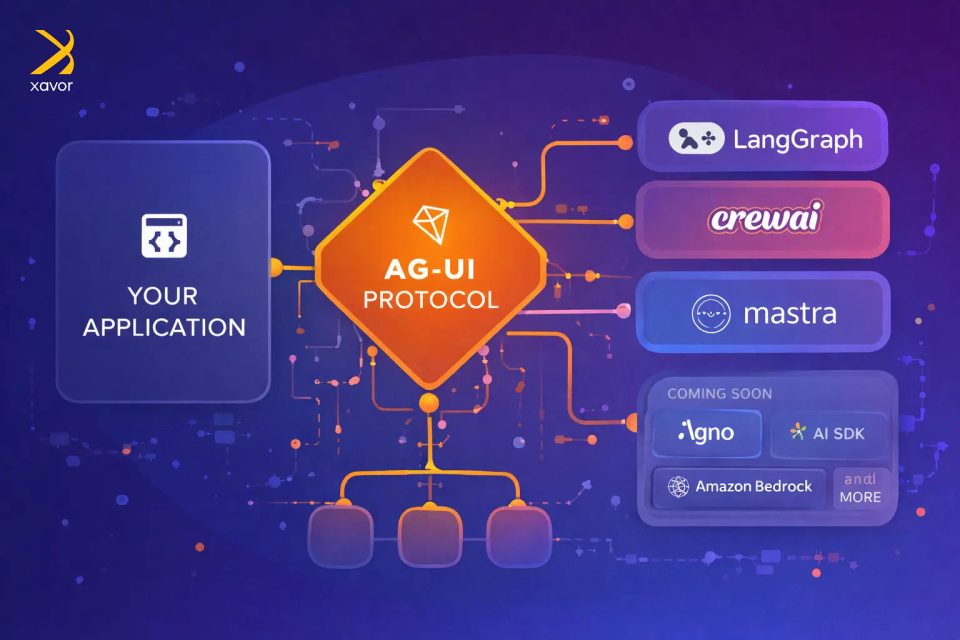
It is an event-based protocol for a real-time, two-way connection between the agent and an app’s frontend. AG-UI has quickly become the de facto standard for agent-user interactions. Google, Amazon, Microsoft, and LangChain are all using it in their agentic AI products.
AG-UI is the third major open agentic AI protocol that has generated a lot of buzz. Together, these three protocols have completed the agentic AI tech stack developers need to create agentic AI solutions in 2026.
| Protocol | Created by | Release date | What it connects | Core purpose |
| MCP | Anthropic | November 2024 | AI agents ↔ external tools | Lets agents securely connect to external resources to enhance capabilities |
| A2A | April 2025 | AI agents ↔ AI agents | Defines how multiple AI agents built differently collaborate with each other | |
| AG-UI | CopilotKit | May 2025 | AI agents ↔ User interactions | Enables live, two-way interaction between the agent and the user interface |
How AG-UI actually works (for non-techies)
The next few paragraphs will cover the AG-UI workflow that makes all of this possible. AG‑UI sounds technical, and it is, but the idea behind it is surprisingly simple. We’ll try to make it as understandable for all kinds of readers.
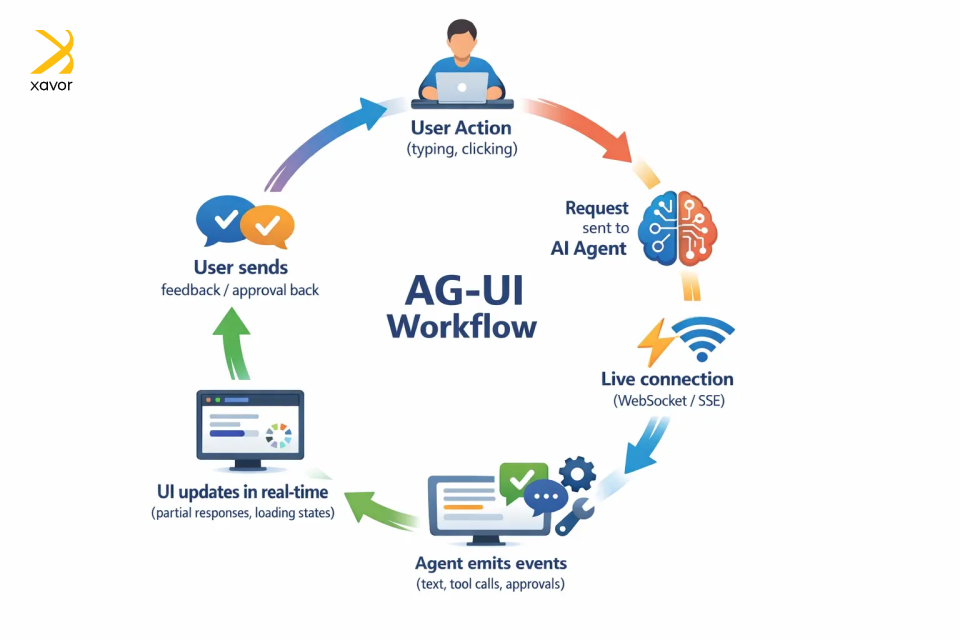
AG-UI works by keeping your app and the agent in a live, two-way conversation instead of the app sending a request and then waiting silently for one final answer.
Here’s the whole workflow in simple terms:
1. Starting the interaction
It all begins with the user taking any action. Like typing a prompt, clicking a button, or uploading a file, just like in any app.
But behind the scenes, the app sends that request to an AI agent using AG‑UI’s standard format so both sides speak the same language.
2. Opening a live connection
Instead of sending one reply and closing the connection, AG‑UI keeps a live channel open between the agent and the app. This is different from regular web or mobile apps that wait for a complete response.
This live connection is usually created through SSE or WebSockets. The channel stays open the entire time the agent is working, so every single thing the agent does gets delivered to your app the moment it happens.
3. Sending structured events
As the agent works, it sends back small, well-defined updates as events. Each event represents a specific thing that happened, such as:
- I generated some text
- I’m calling a tool
- I need user approval
AG-UI has 16 types of standardized event types for real-time communication. The app listens to these events and updates the screen instantly.
4. Updating the UI instantly
Because the app receives updates step‑by‑step, it can update the screen right away. That might mean showing partial text, displaying progress, or reflecting a new action without waiting for the full process to finish.
From the user’s perspective, the AI feels alive and responsive, not stuck or guessing.
5. Two-way communication
Communication is not one-sided. The frontend can also send information back while the agent is still running, such as user approvals, extra input, interface context, or a cancel request.
AG-UI vs A2UI: What’s the difference?
AG-UI and A2UI are two similar-sounding, overlapping technologies in the AI agent ecosystem. But they serve different purposes and are not even direct competitors. Quite the contrary, AGUI and A2UI are complementary technologies that can be used together to create interactive AI apps.
A2UI (Agent-to-User Interface) is a declarative GenUI specification developed by Google. The focus here is that it is a generative UI spec, not a protocol like AG-UI. That means an A2UI does not generate raw HTML or JavaScript to build the interface directly.
Instead of writing UI code, A2UI describes what to render through a JSON description, which is essentially a structured note that gives a clean description of what should appear and what it contains.
Then each platform takes that description and builds the UI its own way, using its own native components. React renders it with React widgets. Flutter renders it with Flutter widgets. SwiftUI with SwiftUI.
AG-UI is the transport protocol that carries A2UI as the content. That is why they are related but not competing. AG-UI can transport many kinds of interaction data, and it can work with multiple generative UI specs, including A2UI, MCP-UI, and Open-JSON-UI.
| AG-UI | A2UI | |
| Purpose | GenUI specification | Agentic AI protocol |
| Focus | UI rendering | Two-way communication |
| Answers | “What to render?” | “How agent and app interact?” |
| Cross-platform | Yes | Platform agnostic |
| Developer | CopilotKit |
The impact of AG-UI on agentic AI applications
AG-UI is a major juncture in AI-powered app development, and we don’t think enough people are talking about it yet. Well, at least not in the non-tech world, because in Silicon Valley, it is the talk of the town.
Right now, AI agent-based apps are very smart and powerful, but interactivity is not their forte. And if you really want to build an AI agent that actually does things on screen, it requires doing a ton of things.
But AG-UI is a common language between agents and user interfaces. Any agent built on AG-UI can plug into any supported app out of the box. This has profound implications for developers, enterprises, and users alike.
1. It makes AI truly responsive and interactive
In a basic chatbot experience, the user asks for something, the interface goes quiet, and then a final answer appears. Even when the AI is doing useful work in the background, the user cannot see what is happening. That often makes the experience feel slow and a little untrustworthy. People start wondering whether the agent is still working or is stuck.
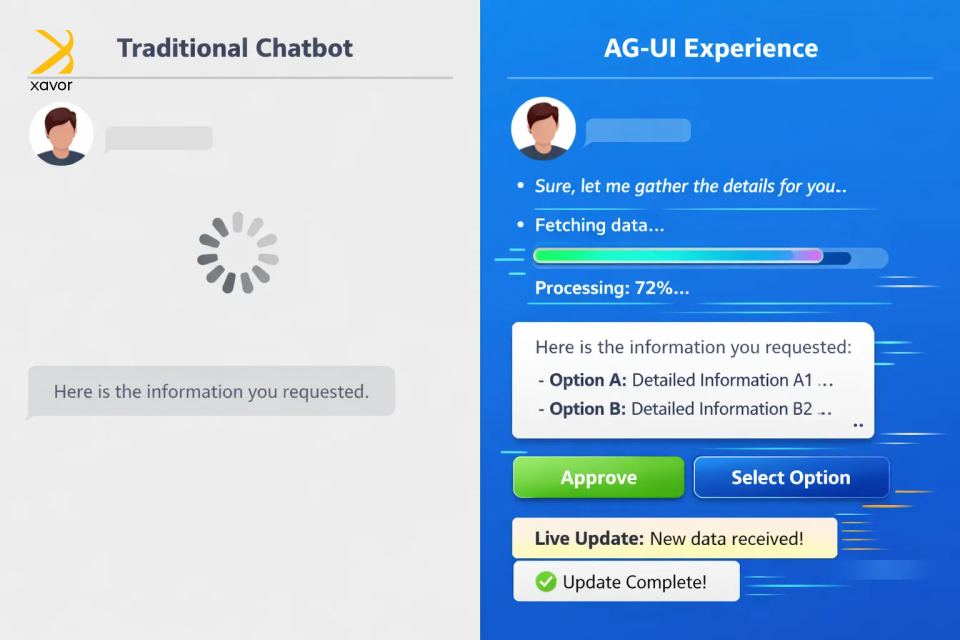
AG-UI helps solve that by making the AI feel more present during the task. Instead of hiding the process, the app can show useful progress updates on the go. That visibility matters because users are no longer waiting blindly. They can see that the system is actively moving through steps and working toward an outcome.
But the bigger shift is that AG-UI also lets users interact with the process itself. The app can present buttons, forms, selections, or approval actions at the right moment. So instead of rewriting the same instruction in text, the user can simply click Approve, choose an option, or fill in a field.
That combination is what makes the experience feel much more natural. The AI is not just replying at the end of a task. It is showing what it is doing, asking for input when needed, and letting the user guide the process in a clearer way.
AG-UI makes AI feel less like a black box chatbot and more like an active assistant users can actually work with.
2. It’s the path towards full-fledged AI apps
Currently, AI in an app is almost always next to your tools, never inside them. You’d ask it something, copy the answer, and paste it somewhere else. That gap has been a persistent problem for developers and users.
Real products don’t work like this. A dashboard has live data that updates. A workflow has steps, approvals, and a state. A tool remembers what you did last, responds to your clicks, and changes based on your input. These are living interfaces, and until now, AI couldn’t really participate in them.
AG-UI changes the relationship. It gives agents a standardized way to push updates, react to user actions, and stay in sync with what’s happening on screen in real time. The agent is present inside the product, aware of context, and capable of doing things where they actually need to happen.
Work and intelligence occupy the same space. That’s the gap AG-UI closes and turns AI into a capable participant embedded in how work actually flows.
3. It has completed the agentic AI toolkit
Developers have been duct-taping things together for years. AG-UI is a huge deal for developers because it gives them a standard way to connect agent backends to user-facing apps. It was the final trick missing in the repertoire of agentic AI development.
AG-UI matters for developers in three practical ways. First, it reduces fragmentation since an agent that “speaks” AG-UI can work with AG-UI-compatible clients, which makes integration more reusable and less custom.
Second, it makes richer UX patterns easier to build because the protocol already centers on structured events, streaming, and state instead of plain text replies. And third, it supports features developers usually have to invent themselves, like shared state, human-in-the-loop approvals, and predictive state updates.
All of this has compounding effects for enterprises as well. In fact, the value is even bigger for businesses because AG-UI helps make AI fit as a real business software. Microsoft explicitly highlights approval workflows for sensitive actions, real-time feedback, and synchronized state for interactive experiences. That is important in enterprise settings where users need visibility and control.
Conclusion
Major tech breakthroughs have always had a ripple effect on user interface design. Web 2.0 introduced more interactive, dynamic UIs where users could click around to explore. It was a big improvement from the boring static interfaces of the early days of the internet.
AI is also opening the door for the future age of user interactions. But this time, it will become more adaptive with AG-UI. Instead of only reacting to clicks, AG-UI can respond to the user’s intent, context, and shape the experience in real time. This will effectively make UI a part of the system’s output.
This piece was just our perspective on what your product could look like if AI could actively participate in UI design instead of just supporting it. There is plenty more to share as Xavor’s agentic AI services are working on AG-UI, MCP, A2UI, and other emerging technologies to create agent-native products.
Contact us at (email protected) if you want to discuss your AI agent project. Our agentic AI experts will help architect and implement AI systems that integrate directly into your workflows and products.
About the Author

Umair Falak is the SEO Lead at Xavor Corporation, driving organic growth through data-driven search strategies and high-impact content optimization. With hands-on experience in technical SEO and performance analytics, he turns search insights into measurable business results.
FAQs
AG-UI is used to connect AI agents with user-facing applications in real time. It lets apps stream agent updates, show interactive UI elements, collect user input or approvals, and keep the frontend and agent in sync during a task.
MCP UI focuses on what interface components an AI can expose through MCP-connected tools. AG-UI focuses on how the agent and the frontend communicate in real time, including streaming updates, approvals, and shared state during the interaction.
Generative UI creates interface elements dynamically at runtime as part of the product experience. AI-assisted design, by contrast, helps humans design interfaces faster, but the final UI is still usually reviewed and built in advance.


