AI is intelligent. We all know that, but being intelligent is not always enough. It must reflect your user experience and brand image. Using AI agents should feel like a natural experience with a clean, modern interface in real time.
But usually, platform-native agentic solutions come with a generic UI that isn’t easy to use. That is also the case with Salesforce Agentforce. A growing number of businesses are adopting Agentforce to build AI-powered customer experiences directly within their CRM.
The platform offers powerful capabilities for automation and conversational AI. However, many teams have encountered limited UI customization and personalization options when deploying Agentforce in real-world environments.
On top of that, there is a lack of recent chats/history when users want to reopen an old conversation.
In this article, we’ll explore how these challenges can be solved by extending Agentforce using custom UI and APIs without replacing the core platform.
What is Salesforce Agentforce?
Salesforce Agentforce is an AI agent platform that allows businesses to create autonomous agents capable of handling various customer interactions. You can create agents in the platform that can automate workflows and improve service efficiency.
Agentforce integrates deeply with Salesforce products and uses real-time data to deliver context-aware responses.
Why Agentforce falls short on UI customization?
Like many evolving AI platforms, certain user experience features are still limited in Agentforce’s default environment. There are a few reasons why that is the case.
1. Logic takes precedence over presentation
Most enterprise AI platforms, Agentforce included, are engineered from the ground up as back-end reasoning engines. As much as we disagree with this approach, the UI is usually bolted as an afterthought onto a powerful orchestration core.
That is why the default chat interface exists to make the agent usable quickly, but it is not meant to replace a fully custom product interface.
2. Restrictions of native components
Agentforce is built inside the Salesforce ecosystem, so you cannot customize its interface the same way you would customize a normal website or app.
You have to work through its own front-end system, branded as Lightning Web Components (LWCs). LWCs are Salesforce-specific, which restricts your design options and custom UI elements to Salesforce’s rules and structure. So, businesses cannot always create the exact branded AI experience they want.
3. The default UI is generic for purpose
Salesforce has to provide a default interface that works for many industries and environments. Because of that, the native UI tends to be standardized. It is safe and functional, but not always deeply branded or tailored.
For more granular control, Salesforce recommends custom client deployments for Enhanced Chat. But custom client deployments require developers who understand REST APIs and a ton of other things.
4. Design and transparency clash
There’s a fundamental tension between showing what an agent is doing and keeping an interface clean and brand-consistent. What many platforms skip is the part that makes the agent’s reasoning visible and gives users a clear path to intervene.
And that interface layer is also a governance and legal risk surface. Designing for both transparency and aesthetics simultaneously is a hard problem most platforms haven’t solved.
Apart from these, there are some security and governance requirements that constrain the frontend of AI interfaces.
Key challenges in real implementations
Now, let’s take a look at some ground realities when users implement Agentforce in their workflows.
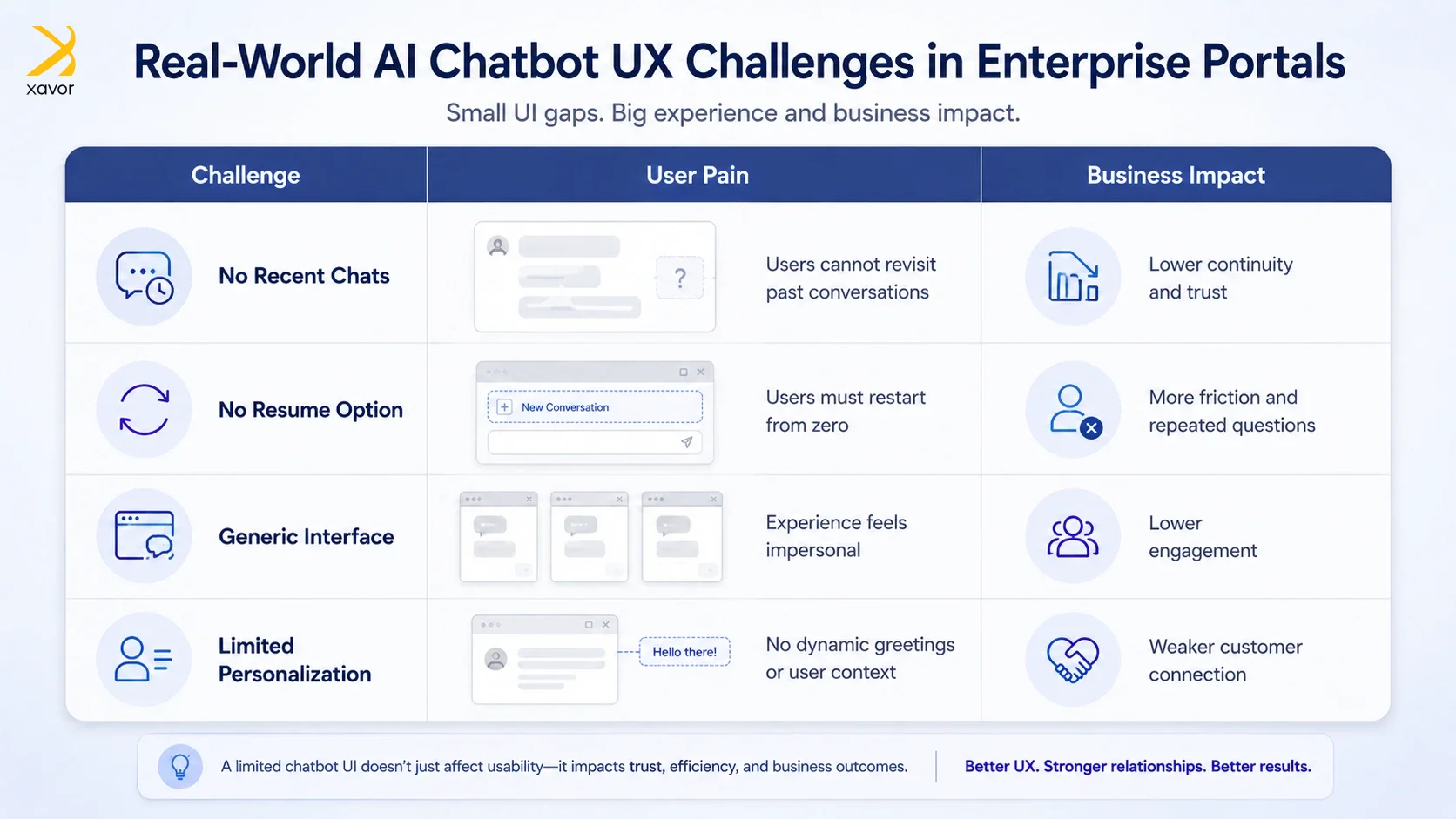
1. No native recent chats feature
Think about how you use WhatsApp or Gmail. You can always scroll back to pick up where you left off, and the system remembers you were there. Agentforce, in its default deployment, doesn’t offer this.
And that’s a lot of inconveniences for users interacting with Agentforce agents, such as:
- They cannot view previous conversations
- No way to resume earlier chats
- Lack of continuity in interactions
These negative effects badly impact user experience, especially for returning customers.
2. Limited UI and Personalization Control
The default Agentforce chat interface is functional but rigid. It looks largely the same regardless of which company deploys it or which user is interacting with it. And the layers of personalization that are missing result in generic interactions rather than personalized experiences, like.
- Limited UI flexibility
- No support for dynamic greetings (e.g., showing logged-in user name)
How you can extend Agentforce with custom UI and APIs
The instinct many teams have when they hit Agentforce’s UI limitations is to build something entirely new. That’s the wrong move and an expensive one at that. The smarter path is to think of Agentforce in two separate layers. Agentforce is an exceptionally capable brain. The problem is just that its default face is generic.
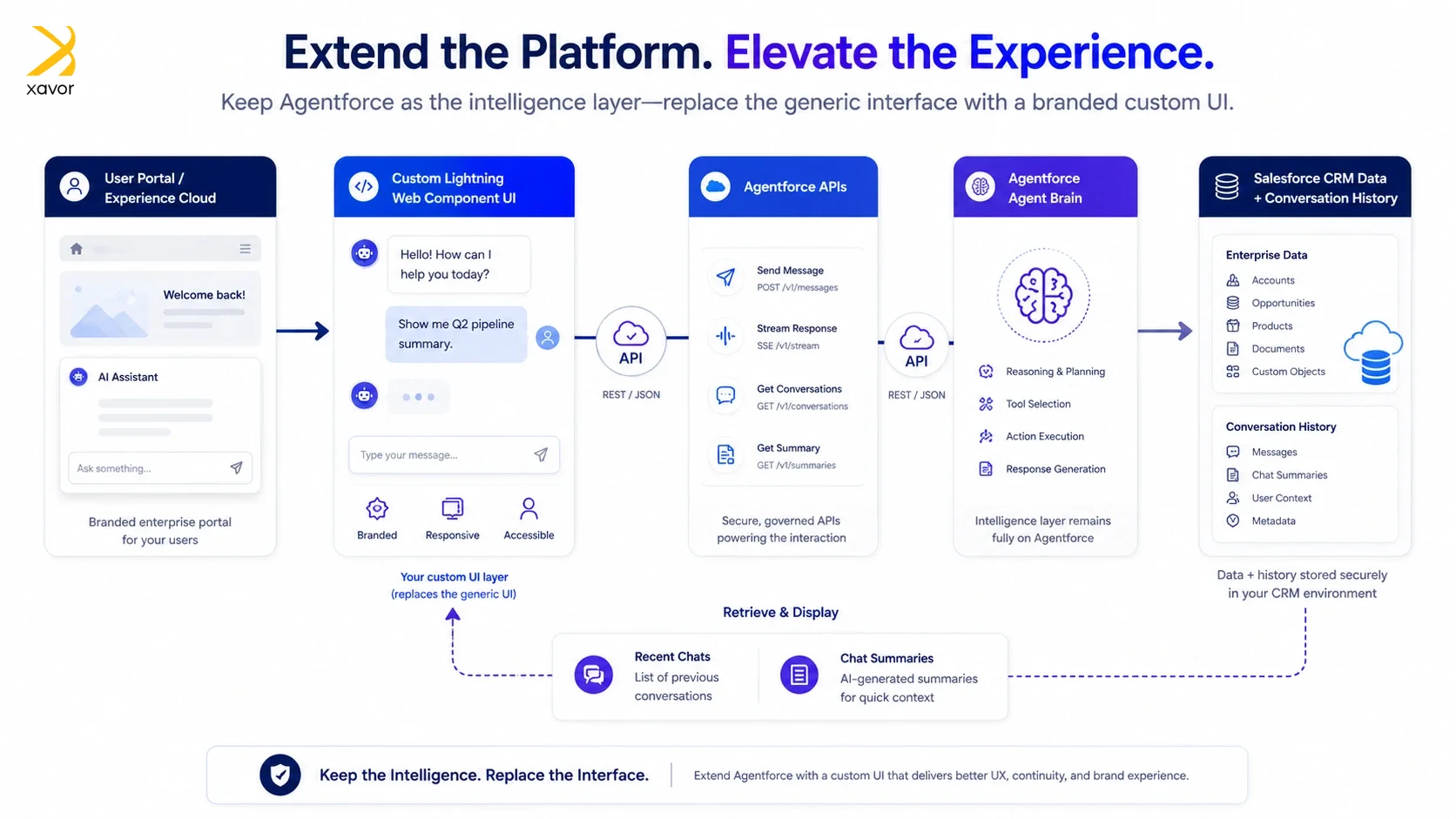
So, instead of building a separate chatbot system, a more efficient approach is to:
- Continue using the same Agentforce agent
- Interact with it via Agentforce APIs
- Build a custom UI layer on top of existing functionality
Building a custom UI this way preserves the intelligence of Agentforce while enabling full control over user experience.
Here’s how you can implement a custom UI in Agentforce:
1. Custom UI layer in experience cloud
You start by building a custom LWC that visually replaces the default chat UI. This component handles everything the user sees and touches, like the chat window and the layout. But it does so by communicating directly with Agentforce through its APIs to:
- Replace default chat UI components
- Enable flexible design and layout control
- Connect directly with Agentforce APIs
2. Adding a recent chats feature
Now, you have the ability to store and retrieve conversation data in ways the default Agentforce implementation never could. But you still need an entry point for accessing past conversations.
To solve this chat history limitation:
- Introduce a custom header component
- Develop a modal interface to display:
- Previous conversations
- Chat summaries
Adding these two enables users to:
- Revisit past interactions
- Continue conversations without starting over
3. Personalized greeting messages
A personalized greeting message looks deceptively simple on the surface, but carries significant weight in terms of how users feel about an interaction before it even begins. It is often the first thing a user reads when they open the chat. Getting it right sets the entire tone.
To do this, take the user context from the portal:
- Retrieve logged-in user data
- Customize greeting messages dynamically
For example, “Hi John, how can I assist you today?” It will significantly improve engagement and user experience.
4. Full UI Customization
The final step is a little bit advanced. It takes the foundation further to expand customizations. Every visual element is now under deliberate control. Animation timing, color schemes, icon choices, and font hierarchy reflect the brand and the product design standards of the organization deploying it.
- Fully customized chat interface
- Additional features such as:
- Recent reports section
- Enhanced layout and usability
- Improved accessibility and responsiveness
A user opening this interface shouldn’t feel like they’re inside Salesforce. They should feel like they’re inside your product.
Benefits of customizing UI in Agentforce
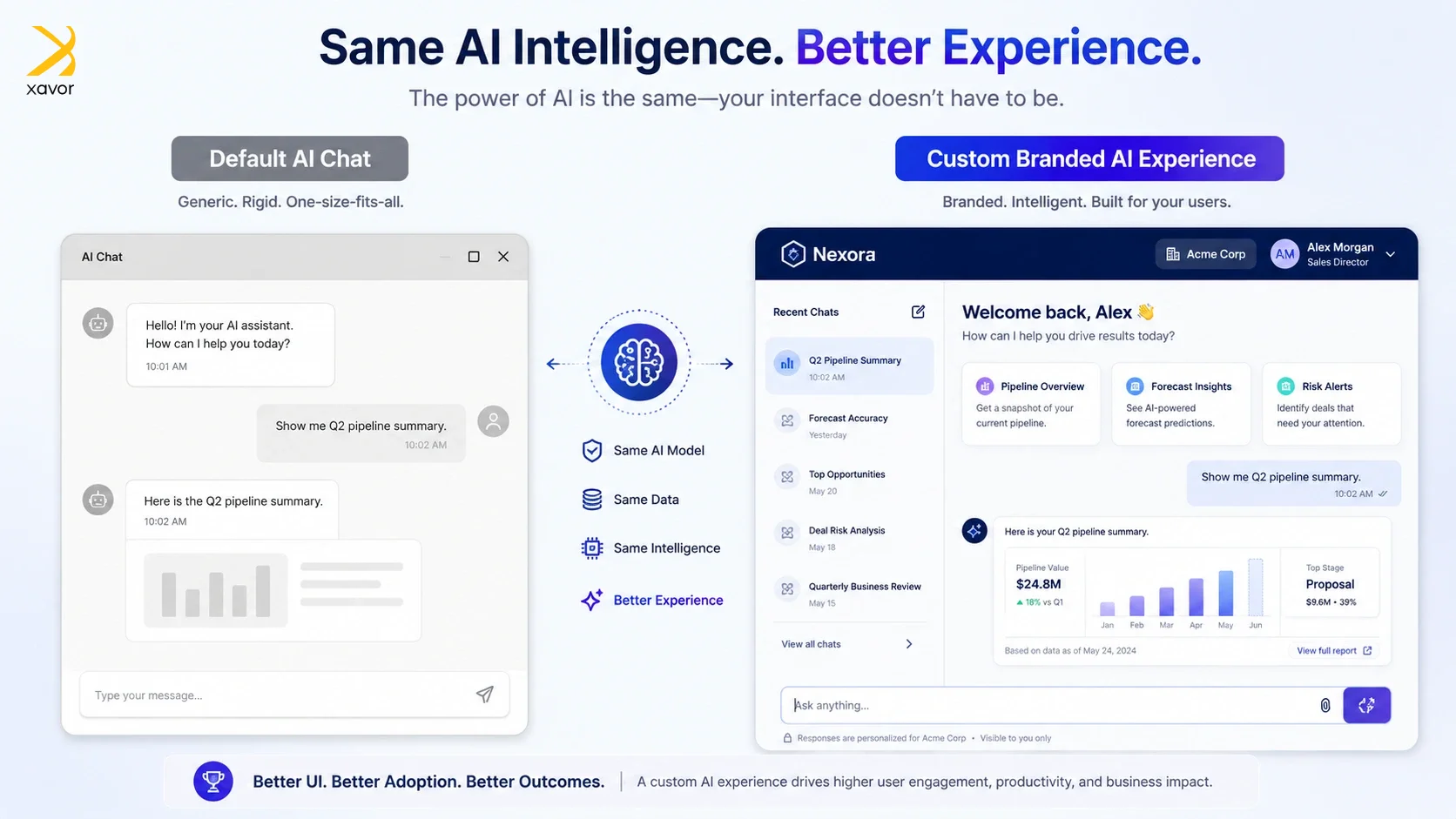
1. Improved customer experience
Access to chat history builds trust in more ways than you may realize. When a user returns to a platform and finds their previous conversations intact and accessible, it communicates that the system recognizes them and respects their time. That feeling is the foundation of a good customer relationship.
A returning user can open their last conversation to see exactly where things stand. And either continue that thread or start a new one with full awareness of the prior context. The agent can also be fed that context through the API.
2. Higher engagement
There’s a well-documented psychological principle that people engage more openly and more fully with systems and people that recognize them. And a personalized greeting activates a different mode of interaction from the user. They feel seen, so they lean in rather than holding back.
When a chat opens with “Hi John, how can I assist you today?” instead of a generic prompt, John’s relationship with that interaction changes immediately. He’s more likely to ask a detailed question and more likely to complete whatever task brought him there. The interaction feels natural rather than transactional.
3. Flexibility and scalability
One of the most practically valuable aspects of this approach is its modularity. You don’t have to do everything at once, and you don’t have to do everything everywhere. If the most pressing problem today is the missing chat history feature, you build that component.
The architecture allows you to improve specific parts of the experience without risking the parts that are already working.
It is genuinely different from how platform-native solutions work. With the default Agentforce UI, you either accept what Salesforce gives you or you invest heavily in platform-specific customization that has a high ceiling on what’s possible.
4. Cost-effective enhancement
A custom UI reframes how organizations should think about their Agentforce deployment. The common mistake is treating UI limitations as a reason to question the entire platform investment.
But the right frame is to recognize that the intelligence layer represents enormous value that took significant time and resources to build.
Discarding all of that to start fresh with a different platform doesn’t solve the UI problem. It trades one set of limitations for another, while throwing away everything that already works.
When is the right time to customize Agentforce
Not every Agentforce deployment needs a custom UI. The default implementation is perfectly adequate for situations where users are primarily Salesforce-trained employees who care about function over form.
But there are three specific conditions where customization is the way to go.
- You are using Salesforce Agentforce in portals or community sites
- You need better UX than the default capabilities
- Your users require chat continuity and personalization
Conclusion
Agentforce is a genuinely powerful platform. Nothing about its utility or performance is in question. What is in question is whether that intelligence is being delivered through an experience worthy of it.
The gap between what Agentforce can do and how users experience it can be a hindrance. But it’s also a design opportunity. And the approach outlined in this piece is how you can close that gap without starting over.
The greater implication here extends beyond Agentforce specifically. We are entering a period where virtually every enterprise platform will have capable AI embedded within it.
As Steve Jobs used to say, design is not just what it looks like and feels like. But how it works.
Ready to build an Agentforce experience your users will actually love? Xavor’s Salesforce development services specialize in extending Agentforce with custom UI solutions that preserve your platform investment while transforming how your customers interact with it.
Contact us at (email protected) to book a free consultation session.
About the Author

Salman is a Salesforce CRM Consultant and Architecture Lead at Xavor with over 14 years of professional IT experience. Certified in Salesforce and Azure IoT, he designs complex software architectures and delivers high-impact cloud solutions for demanding global hi-tech clients.
FAQs
Agentforce does not natively provide a robust recent chats or conversation history experience in its default UI. However, developers can implement custom chat history and conversation resume features using APIs, custom components, and backend storage.
Yes, Salesforce Agentforce UI can be customized using Lightning Web Components (LWCs), custom client deployments, and Agentforce APIs. Businesses can create branded chat experiences with custom layouts, personalized greetings, and additional interface features beyond the default UI.
You can use Messaging for In-App and Web with Agentforce by connecting Salesforce messaging channels to your Agentforce agent and embedding the messaging client into your website or application. For advanced experiences, developers can build custom chat interfaces that interact with Agentforce through messaging APIs and custom UI components.


