Retail stores and warehouses are like labyrinths. Amazon’s new I-25 fulfillment center in Colorado spans 650,000 square feet, so large that fog forms inside it. That is where all the inventory gets stored and organized before it’s shipped to your doorstep.
Even the shelves of medium-scale grocery stores are restocked and emptied throughout the day. Therefore, it’s no surprise that things can sometimes get misplaced. Products go missing, or some shelves are mislabeled. Now imagine if you have to do the night shift to manually count the stock. It would be like finding a needle in a haystack.
That’s why computer vision and AI solutions in retail has grown in numbers. These smart retail solutions monitor store aisles multiple times a day, using cameras and scanners to keep everything in check.
In this blog, we’ll explain the importance of retail computer vision and why your store needs it. Finally, we’ll list out all the essential techie things you need in order to give your store eyes to see what’s happening.
What is retail computer vision?
Computer vision in retail uses cameras and AI solutions to watch and understand what’s happening in physical retail environments. It gives the store a set of eyes that can visualize usable information.
You see, retail stores are a hectic place to be. Thousands of boxes and products come and go. And it’s not always possible to have clear visibility of your inventory at all times. But computer vision in retail converts what it sees into data. Data that tells you what’s on the shelves, spot wrong prices, misplaces items, and understand what needs your attention first.
It is a form of retail automation that includes many other smart retail solutions, such as customer service robots.
Why your store needs computer vision: 5 applications
A picture is worth a thousand words, they say. But computer vision in retail uses visuals to actually give you thousands of ROI. According to one report, the market for computer vision in retail will reach $9.88 billion by 2029.
Research has noted that out-of-stock items alone can cost retailers up to 4% of annual sales. And not because products don’t exist, but because visibility fails. That statistic highlights a deeper truth that in modern retail, lost revenue often comes from blind spots. Computer vision in retail reduces those blind spots.
That is why retailers are actively leaning towards computer vision because it is highly accurate and provides visibility into their retail operations.
1. Inventory management
In physical stores, keeping shelves stocked matters more than people think. If a shopper can’t find the item they came for, they might grab a substitute. But a surprisingly large number will simply leave without buying and may go to a competitor instead.
Computer vision in retail helps prevent that by using cameras and AI to watch shelves and turn what it sees into inventory actions. The system monitors shelves automatically. It can estimate how much stock is left on the shelf, notice when items are running low, and spot empty spaces. Furthermore, it can send replenishment alerts.
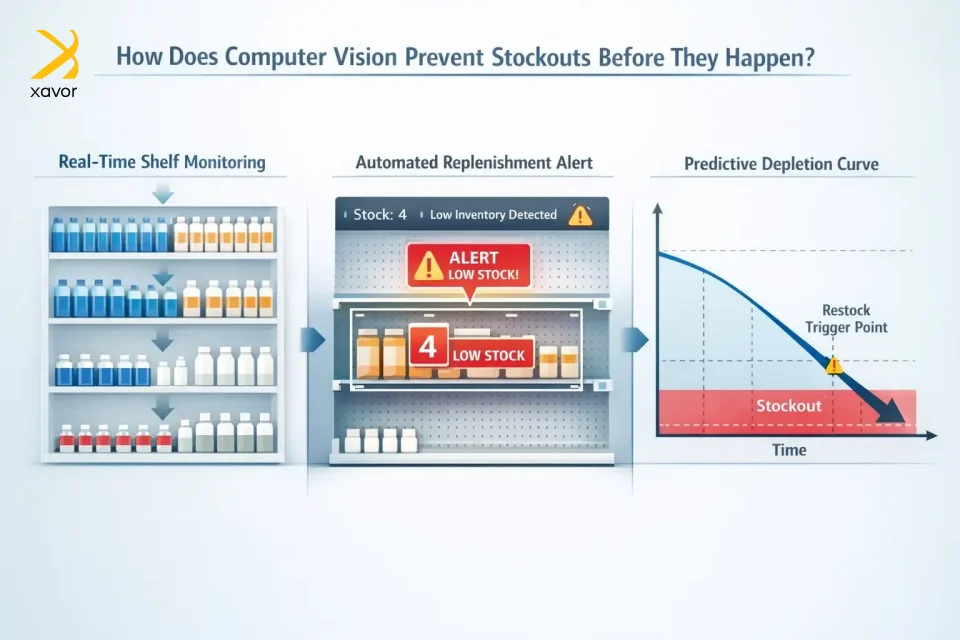
The staff gets notified when a shelf needs restocking. In more advanced setups, the system can also trigger reordering or restocking workflows automatically, so the process doesn’t depend on someone noticing the problem.
Xavor’s AI team also works on predictive management to identify which items are running low and estimate when they’ll need restocking based on how quickly they’re being bought.
2. Crowd and footfall analysis
Even with minimal advertisements, an average high-street shop gets noticeable visitors a day. That number is in the hundreds for bigger stores, and on dates like Black Friday, it can reach thousands.
Store traffic analysis is vital to measure sales conversion. POS data only shows what you sold. But the why behind those products is sold requires marketing insights that computer vision in retail can provide, with crowd and footfall analysis.
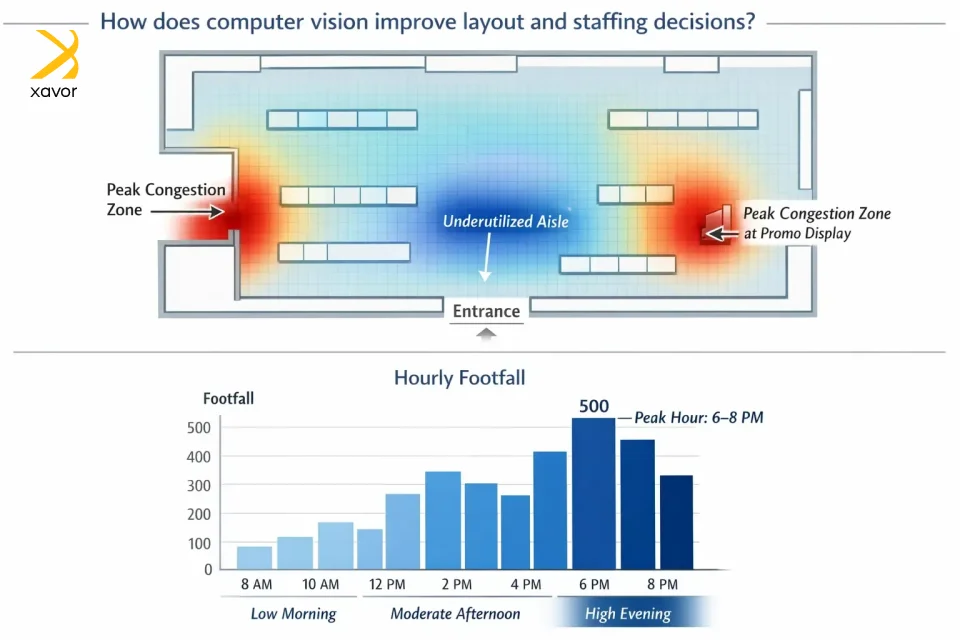
Crowd analysis uses cameras and AI to understand how groups of shoppers move and behave in a store. It can estimate how many people are in an area, detect congestion, and spot patterns like bottlenecks near entrances or popular displays. This helps retailers improve store layout, staffing, and safety by reducing crowding and making shopper flow smoother.
Moreover, footfall analysis uses cameras and AI to measure how many people enter a store and how traffic spreads across different zones. It shows which aisles and sections get the most visits, when peak hours happen, and which areas are being ignored. This helps retailers optimize staffing, merchandising, and promotions based on where shoppers actually go.
3. Loss prevention
You went to a store, and the system there shows the item you want to buy as in stock. But later, you find out it actually isn’t available at the moment. Yeah, this is not uncommon in retail operations. Phantom inventory is really frustrating for customers, and for retailers, it can cause revenue loss of 3–5% every year.
So, why does it happen? Products usually disappear due to:
- Lost in transit
- Scanning mistakes
- Theft
- Misplaced in the wrong aisle
And sometimes they’re just sitting in the backroom because someone forgot to open the box. Computer vision in retail watches and flags behavior that often correlates with theft or fraud. Like hiding items, skipping scanning steps, or unusual checkout behavior. The goal is to detect risk signals and alert staff to review.
One of the most proven use cases is also preventing POS fraud, especially employee-related shrinkage. At checkout, things like unscanned items, a cashier giving improper markdowns, or transaction manipulation result in retail losses.
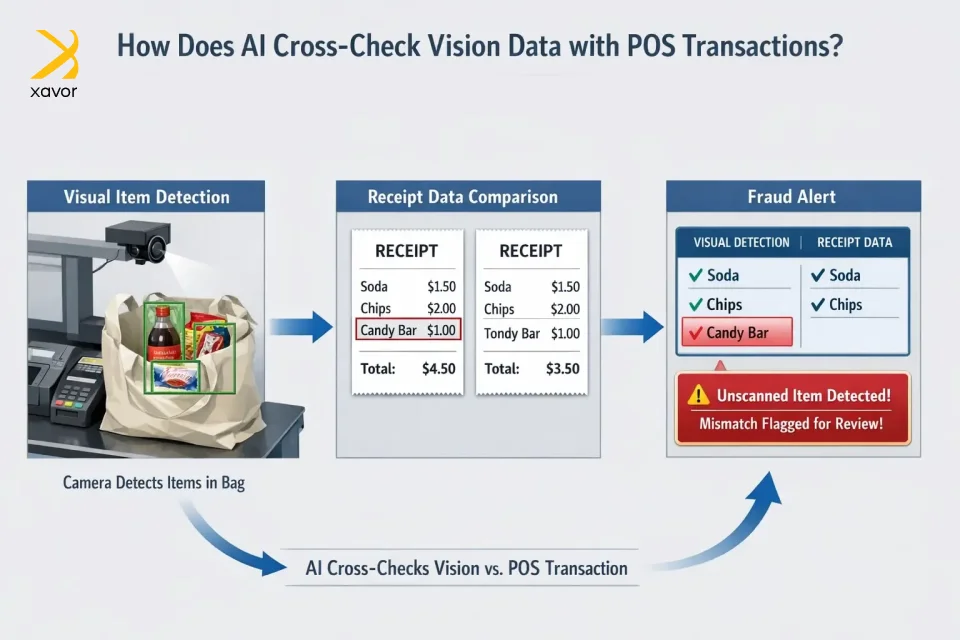
The camera identifies the items in the checkout area. Then it cross-checks that visual record against the transaction data. And if there’s a mismatch, it flags it for review. For example, an item appears to be bagged but doesn’t show up on the receipt, or a discount pattern looks abnormal.
4. Quality control
In retail, quality control usually means someone has to walk the aisles and check products by hand. Looking for damaged packaging, wrong labels, or expired items. That work is slow and easy to miss when stores are busy.
Computer vision in retail changes that by letting cameras and AI do the first pass automatically. Advanced imaging systems can scan shelves or incoming stock, spot packaging defects, and read expiration dates, so staff don’t have to inspect everything manually.
When a store can detect unsellable items early, it prevents the most common chain reaction in retail. Like a customer buys something bad, loses trust, complains publicly, or in worst cases, triggers legal or regulatory issues. With perishables, the stakes are higher. Vision systems can be used at receiving to flag shipments with too little shelf life left, so the retailer can refuse or reroute them instead of letting them quietly reach the shelf and become a health risk.
Then there’s the next layer of combining vision with predictive analytics. Once the store can see what’s happening in real time, what’s moving, what’s being touched, what’s getting depleted, and the sorts. Those signals can be paired with historical patterns and outside factors like seasons or even weather. The result is smarter demand prediction, which lets retailers source more accurately and avoid empty shelves from under-ordering.
So instead of quality control being a manual cleanup job after problems appear, computer vision turns it into a proactive system to keep inventory aligned with actual demand.
5. Cashierless stores
Self-checkouts were first introduced in 1986 by Kroger and are pretty widespread now. But cashierless checkouts are even more advanced. A self-checkout still uses a kiosk where the shopper scans each item and pays on their own. On the other hand, cashierless checkouts remove the scanning step entirely. The system automatically identifies what the shopper took and charges them, so they can just shop and leave without stopping at a kiosk.
The concept has been around for a long time, but modern systems have become much more capable because of computer vision and deep learning. Cameras and AI watch what’s happening in the store. When a customer picks up an item, the system recognizes the product and keeps a running list of what that customer has taken. Instead of relying on a cashier to scan barcodes one by one, the AI identifies items visually and knows their prices. When the customer is done, the system totals everything automatically and completes checkout with minimal friction.
Computer vision in retail is already used by giants like Amazon. And for small retailers, it means less dependence on barcode scanning and a more reliable way to process transactions.
How Xavor builds eyes for your store with retail computer vision
Okay, now let’s get to the part about how you can actually implement computer vision in retail. Retailers usually depend on third-party vendors to store and analyze data from their store cameras and sensors. However, this dependence makes insights slower and limited in scope.
But Xavor handles both the hardware and software of retail computer vision. We build both the devices and the cloud app you need to truly let your store shine. And if that’s not enough, we build custom solutions for specific retailer needs.
1. Building the brain with edge computing
We start with high-definition cameras placed in practical spots, like aisles, entrances, shelf areas, and checkout counters. These cameras aren’t just recording like traditional CCTV. They act more like sensors, constantly capturing what’s happening and sending the video feed to a nearby device in the store.
That nearby device is the edge computer, which is the store’s actual brain. It processes the video on-site and in real time. This gives you both speed and privacy whenever you need it.
Instead of sending a full video to the cloud, the edge device outputs metadata. These are useful facts extracted from the footage.
2. Cloud is the intelligence center
That metadata is then sent to a cloud AI platform, which acts like the system’s intelligence center. The cloud is where we combine data from many stores and analyze it at scale. It’s good for slower, bigger-picture questions like:
- When are peak shopping hours across regions?
- Which promotions actually increased attention and sales?
- How do trends differ by store type or location?
Our cloud experts work with AWS, Azure, Google Cloud, or your private cloud platforms, so you can run network-wide analytics and dashboards.
3. Embedding AI features
Once all of the above is in place, the system relies on a few key AI technologies under the hood. First, we implement object detection to identify specific objects in the video, such as a cart, a product, or a person.
Secondly, our experts work on object tracking to follow those detected objects as they move. It is indispensable for the system to understand paths and behavior over time. Lastly, attribute recognition extracts additional details from what it sees, such as product SKUs or broad demographics.
Conclusion
Retail has always depended on visibility. For decades, that visibility came from manual audits and barcode scans. But that model can’t scale for modern stores and supply chains. Computer vision changes how retail thinks about operations altogether.
Throughout this blog, we’ve explored how computer vision turns physical activity into structured, usable data. Inventory accuracy, footfall analysis, loss prevention, quality control, and cashierless experiences all show a consistent pattern. When stores can see clearly, they act faster and waste less. Cameras alone don’t create value; rather, insight does. And insight comes from combining edge computing, cloud intelligence, and AI models that convert movement, placement, and behavior into decisions.
The broader implication is that physical retail is no longer disconnected from digital intelligence. The line between brick-and-mortar and data-driven enterprise is disappearing. Stores are becoming sensor-rich environments where operational decisions are guided by continuous feedback loops. The retailers who adapt will operate leaner, safer, and smarter. Those who don’t risk running complex environments with limited visibility.
If you’re ready to turn your retail space into an intelligent, insight-driven environment, partner with Xavor to design and deploy a custom computer vision solution built for your business. Contact us at (email protected) to discuss with our AI team and give your store the vision it needs to compete.
About the Author

Umair Falak is the SEO Lead at Xavor Corporation, driving organic growth through data-driven search strategies and high-impact content optimization. With hands-on experience in technical SEO and performance analytics, he turns search insights into measurable business results.
FAQs
Computer vision in retail uses cameras and AI to monitor shelves, aisles, and checkout areas and turn what it sees into actionable data. It helps retailers track inventory and out-of-stocks, analyze footfall and shopper behavior, prevent loss, and improve quality checks and checkout experiences.
You can use AI in your retail store to automate inventory tracking, analyze customer footfall and behavior, prevent shrinkage, optimize pricing and promotions, and improve demand forecasting. By combining cameras, sensors, POS data, and cloud analytics, AI helps you make faster, data-driven decisions and run operations more efficiently.
The three R’s of computer vision are Recognition, Reconstruction, and Reorganization. They refer to identifying what is in an image, which is recognition. Then inferring 3D structure or depth is reconstruction, and grouping/segmenting the scene into meaningful parts qualifies as reorganization.